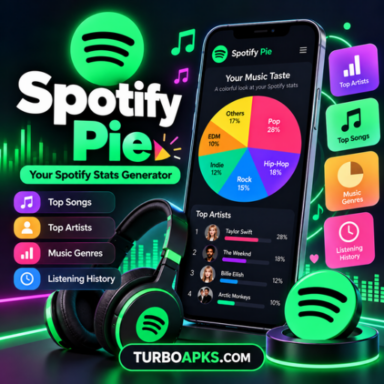
Discover your music taste with a fun Spotify stats generator that transforms your listening history into colorful charts. Explore your top Spotify artists, favorite songs, music genres, and listening habits with personalized visualizations. Compare Spotify Pie Charts,
Spotify Stats, Receiptify, and Spotify Bubble Charts to find new ways to explore your musical interests. Learn how to check monthly and all-time. Discover your music taste with Spotify Pie, a fun Spotify stats generator that transforms your listening history into colorful charts, discover music trends, and explores Spotify Wrapped. Find useful tools, alternatives, features, and privacy tips to enjoy your Spotify music journey.
What Is Spotify Pie?
Spotify Pie APK is a third-party music statistics tool created by Darren Huang, a UCLA student. It became popular in 2022 because it allowed users to turn their Spotify listening preferences into a colorful, shareable chart. The main idea is simple. The tool analyzes available information about your favorite artists and music genres and displays the results as a pie chart. Different colors represent different genres, making it easier to understand your musical preferences.
For example, imagine you regularly listen to pop, hip-hop, rock, and classical music. A chart might display these genres in different colors, with larger sections representing genres that have a stronger presence in the available data. Your chart may also help you discover artists you listen to frequently but rarely think about. It is important to understand that the chart is an overview of your music preferences, not a complete record of every song you have ever played. The exact results depend on the data and features available through the tool.
Why Choose This Music Statistics Tool?
Many music lovers want to understand their listening habits without reading complicated statistics. A visual chart makes this information easier to explore.
Here are some reasons people enjoy this type of music analysis.
1. Understand Your Music Taste
You may believe that you mostly listen to pop music, but your listening data could show that hip-hop, rock, or electronic music also plays an important role in your daily routine.
A visual breakdown helps you compare these interests.
2. Discover Your Favorite Genres
Music genres describe different styles of music. For example, jazz, country, pop, and electronic music have different sounds and traditions.
A genre chart can help you understand which styles are most strongly represented in your listening preferences.
3. Learn More About Your Favorite Artists
Your listening preferences can reveal which artists appear most frequently in your music habits.
This information can help you identify your regular favorites and explore similar artists.
4. Create Shareable Music Content
Colorful music charts are suitable for sharing with friends or posting on social media.
You can compare your music preferences with your friends and discover whether you enjoy similar artists.
5. Explore Music Beyond Spotify Wrapped
Spotify Pie Wrapped provides a personalized summary of listening activity during a particular period each year.
Third-party music statistics tools offer other ways to explore listening preferences throughout the year, depending on their current features and data access.
Features of the Music Genre Chart
The main attraction of this tool is its simple visual presentation. Here are some of the features associated with this type of music analysis.
Colorful Spotify Pie Chart
The Spotify Pie chart is the main feature. It presents music genres in different colors, helping users recognize patterns in their listening preferences. For example, one color might represent pop music, while another represents rock or hip-hop.
The actual colors and genre labels depend on the available data.
Music Genre Breakdown
The chart helps users explore different music styles represented in their listening data. You might discover that you enjoy several genres instead of focusing on just one.
However, the chart should not be treated as a perfect measurement of your total listening time in every genre.
Favorite Artist Information
Music statistics tools may display information about your favorite artists.
This can help you identify performers who appear frequently in your listening preferences.
Different Listening Periods
Some music statistics services support different listening periods, such as recent weeks, several months, or longer-term summaries.
The available periods depend on the service and the data it can access. Not every tool offers the same options.
Easy-to-Understand Results
A colorful chart is easier to understand than a large spreadsheet of artist names and statistics.
You can quickly see which genres stand out and explore the smaller sections to learn more about your musical interests.
Social Sharing
Music charts can be interesting conversation starters. You can share your results with friends, compare favorite artists, and discuss why you enjoy particular styles of music.
Before sharing a screenshot, check that it does not reveal personal information you would prefer to keep private.
How Does the Tool Work?
The process generally involves connecting a Spotify Pie account, allowing access to selected music information, and displaying the available results.
Here is how the process works in simple steps.
Step 1: Choose a Music Statistics Website
Find a music statistics service that offers genre charts or similar visual reports.
Check that the website is legitimate and that its features are currently working before connecting your account.
Step 2: Connect Your Spotify Account
If the service supports Spotify sign-in, it may direct you to Spotify’s official authorization page. Authorization means giving a service permission to access certain information from your account.
Read the requested permissions carefully before continuing.
Step 3: Approve the Required Permissions
Only approve permissions that make sense for the feature you want to use. A simple music chart should not require you to share your Spotify Pie password directly with an unfamiliar website.
If anything looks suspicious, cancel the process.
Step 4: Generate Your Music Chart
After authorization, the service may retrieve the available listening preference information and organize it into a visual chart.
The time required depends on the service, your account, and the amount of information it processes.
Step 5: Explore Your Results
Review the displayed genres and artists.
Think about whether the chart matches your actual listening habits. Remember that the results may not represent every song you have played.
Step 6: Save or Share Your Chart
If the service provides a download or sharing option, you can save the image or share it with friends. Always check the image before posting it publicly.
Important: The original tool’s current availability and functionality could not be independently confirmed during this research. Therefore, these steps describe the general process for Spotify-connected music statistics tools rather than guaranteeing that every step is currently available on the original website.
Image of the Spotify Pie

Tips for Using Music Statistics Tools
You can get more value from music charts by following a few simple tips.
Compare Different Listening Periods
If a service offers several time periods, compare your recent listening habits with its longer-term results. For example, you might listen to more romantic music during one month but prefer upbeat songs over a longer period.
This comparison can help you understand how your musical interests change.
Explore Artists You Do Not Recognize
Sometimes, your listening data includes artists you have forgotten about. Look through your results and revisit songs that you enjoyed in the past.
You may discover new favorites along the way.
Use the Chart for Music Discovery
If you enjoy a particular genre, explore related artists, albums, and playlists. For example, someone who enjoys pop music might explore indie pop or synth-pop.
Treat the chart as a starting point for discovering music rather than a strict description of your personality.
Do Not Compare Results Too Seriously
Your music preferences are personal. A friend might listen to hundreds of rock songs while you prefer classical music. Neither choice is better or worse.
Use the results for entertainment and discovery instead of judging yourself or other people.
Review Account Permissions
Before connecting any third-party service, understand what information it can access.
You should also review connected applications periodically and remove access you no longer need.
Security and Privacy: Is It Safe?
Security is an important consideration whenever a website asks you to connect a personal account. A third-party music analysis service may need access to selected Spotify Pie data to create a personalized chart. However, the safety of the process depends on the actual website, its permissions, and its privacy practices.
Here are some ways to protect yourself.
Use Official Spotify Authorization
When a service supports Spotify Pie sign-in, check that you are redirected to the genuine Spotify authorization page.
Avoid entering your Spotify password into unfamiliar forms on third-party websites.
Read the Requested Permissions
Some applications need permission to read listening information. Others may request additional access.
Only approve the permissions necessary for the feature you want to use.
Check the Privacy Policy
A privacy policy explains how a website handles information. Look for details about what data is collected, how it is used, whether it is stored, and whether it is shared with other organizations.
If these details are unclear, consider using another service.
Remove Unnecessary Access
After using a third-party application, review the connected applications in your Spotify account settings.
If you no longer use a service, revoke its access when appropriate.
Avoid Suspicious Downloads
A music chart is generally a web-based feature. Be cautious if an unfamiliar website asks you to install an APK file, browser extension, or other software without a clear reason. Do not assume that a website is safe simply because it has a professional design.
Privacy reminder: These precautions reduce risk, but they cannot guarantee that every third-party service is safe. Review each service individually before connecting your account.
Alternatives to Consider
If your preferred music chart is unavailable or does not provide enough information, several other services may help you explore your listening habits.
1. Stats.fm
Stats.fm focuses on detailed music statistics. Depending on its current features and your account setup, it can help you explore favorite artists, tracks, albums, and listening history.
It is worth considering if you want more detailed information than a simple genre chart.
2. Stats for Spotify Pie
Stats for Spotify Pie is another option for exploring your favorite artists and tracks. It is useful for people who want a straightforward overview of their listening preferences.
The information available depends on the service’s current functionality and access to Spotify data.
3. Receiptify
Receiptify presents selected music statistics in a receipt-style image. Instead of a colorful pie chart, it creates a shopping-receipt-inspired design featuring music information.
It may suit users who want an attractive image to share on social media.
4. Obscurify
Obscurify focuses on music taste analysis and comparisons with broader listening preferences.
Its purpose is different from a simple genre chart, making it an interesting option for people who want to explore how unusual or mainstream their music taste might be.
5. Icebergify
Icebergify organizes artists into an iceberg-style visual based on their popularity or obscurity. It provides a different way to explore familiar and less widely known artists.
Availability and results can vary, so check the service before relying on a particular feature.
Which Alternative Should You Choose?
The best option depends on what you want to discover.
| Tool | Best For | Main Attraction |
|---|---|---|
| Stats.fm | Detailed listening statistics | Artists, tracks, and listening information |
| Stats for Spotify | Basic music statistics | Favorite artists and songs |
| Receiptify | Social media sharing | Receipt-style music graphics |
| Obscurify | Exploring music taste | Comparisons and taste analysis |
| Icebergify | Discovering artists | Iceberg-style visual presentation |
These services are not identical replacements. Some focus on statistics, while others prioritize creative images or comparisons. Check their current features, pricing, and permissions before choosing one.
Pros and Cons of Spotify Pie
Every online tool has advantages and limitations. Understanding both sides helps you decide whether a music chart is useful for you.
Pros
- Easy to understand: Colorful charts make music preferences simple to explore.
- Visually attractive: The results can be more interesting than a plain list of artists.
- Personalized information: The chart reflects available information associated with your music preferences.
- Useful for discovery: You may find genres or artists you had not considered before.
- Social entertainment: Music charts provide an easy way to start conversations with friends.
- Alternative to annual recaps: Other statistics tools may let you explore your music habits outside Spotify Wrapped season.
Cons
- Limited information: A chart may not include your complete listening history.
- Third-party access: Connecting an account introduces privacy considerations.
- Possible availability issues: The original service may not always work as expected.
- Limited detail: A visual chart may not provide exact play counts or complete listening-time statistics.
- Different results: Other tools may use different data sources or calculations.
- Potential permission concerns: Some services may request access beyond what you expect.
Overall, a music genre chart is useful for entertainment and general exploration, but it should not be treated as a complete or perfectly accurate record of your listening habits.
Frequently Asked Questions
Here are answers to common questions about music genre charts and Spotify Pie statistics.
1. Is Spotify Pie free to use?
The original project was known as a free music visualization tool. However, its current availability, pricing, and functionality could not be independently confirmed during this research.
Check the service’s current website before using it.
2. Do I need a Spotify Pie Premium account?
A paid subscription is not automatically required for every third-party music statistics service. Whether a free or Premium account works depends on the service’s current requirements and available access to Spotify Pie data.
Check the specific service before connecting your account.
3. Can I use it on my mobile phone?
Web-based music statistics tools can often be accessed through a mobile browser if their websites support mobile devices.
The experience depends on the website, your browser, and the current availability of its features.
4. Does the chart show all the songs I have ever played?
Not necessarily. Spotify’s official Web API documentation describes different periods for top artists and tracks: approximately four weeks, six months, and one year.
These periods should not be confused with a complete lifetime listening history. The information shown by a third-party chart depends on the data it can access.
5. Can I share my music chart on Instagram?
If the service allows you to save or share your chart, you can generally post the image on social media.
Check the image for personal information before sharing it publicly.
6. Is the original website still working?
Its current status could not be independently verified during this research. If the original website does not load or its features do not work, consider another established music statistics service.
Avoid suspicious websites claiming to provide an identical tool.
Conclusion
Music statistics are a fun way to discover more about your listening habits. A colorful genre chart can help you explore favorite artists, compare different music styles, and share your musical interests with friends. Spotify Pie became popular because it offered a simple visual way to explore music preferences. However, its current availability could not be confirmed during this research, so readers should check the original service before relying on it.
If you want more detailed information, alternatives such as Stats.fm, Stats for Spotify, Receiptify, Obscurify, and Icebergify offer different ways to explore music statistics. Choose a service that matches your needs, check its privacy practices, and remember that your musical taste does not need to fit into a single category. The best reason to explore music statistics is simple: discovering more of the music you love.