Alarmy V26.21.4 is a powerful alarm clock and sleep tracker app designed for heavy sleepers, students, and busy professionals. It features loud customizable alarm sounds, smart wake-up missions, barcode and photo challenges, math puzzles, memory games, and Wake Up Check to reduce snoozing.
Users can also track sleep habits, monitor snoring, and enjoy relaxing sleep sounds to build healthier routines. The latest update improves morning analysis, recently played sleep sounds, and Wake Up Check visibility. Discover features, benefits, installation information, and security details on TurboApks.com.
Key takeaways
- Alarmy requires users to complete tasks to turn off the alarm, promoting wakefulness.
- The app offers various customization options to suit individual preferences.
- User feedback highlights the effectiveness in improving wake-up habits.
What is Alarmy?
Alarmy is a smartphone application designed to serve as a more effective alarm clock than traditional devices. Its primary purpose is to help users wake up on time by requiring them to engage in specific tasks before the alarm can be turned off. This approach targets the common problem of oversleeping and encourages users to become more alert upon waking.
Developed with the understanding that many people struggle with conventional alarms, incorporates various interactive features that cater to different user preferences. By transforming the wake-up experience into an active process, aims to reduce the likelihood of users hitting the snooze button and falling back asleep.
How Alarmy Works?
The functionality of Alarmy is straightforward yet effective. Once the app is downloaded and set up, users can create alarms by selecting the time, sound, and wake-up tasks they prefer. The app’s interface is user-friendly, making it easy to navigate through the different settings.
When the alarm goes off, users must complete the selected task to turn it off. For example, if a user chooses to solve a math problem, they must correctly answer the question before the alarm ceases. This requirement ensures that users are mentally engaged, reducing the chances of falling back asleep. Also tracks user performance, allowing individuals to see how often they successfully wake up on time, which can motivate consistent use.
User Experience and Feedback
User feedback on Alarmy has been largely positive, with many users praising its effectiveness in helping them wake up on time. Reviews often highlight the app’s unique features, which make the waking process more engaging and less monotonous compared to traditional alarms. Users appreciate the ability to choose tasks that resonate with their interests, whether it’s a challenging math problem or a fun photo-taking challenge.
Some users have noted that the requirement to complete tasks can be challenging, especially when they are still groggy. However, this challenge is often viewed as a beneficial aspect, as it pushes users to fully wake up and start their day. Overall, has garnered a reputation for being a reliable tool for improving wake-up habits, and many users report feeling more energized and ready to tackle their day after using the app.
Features of Alarmy
The application includes several tools that make it different from traditional alarm clocks. Let’s explore some of its important features.
1. Mission-Based Alarm
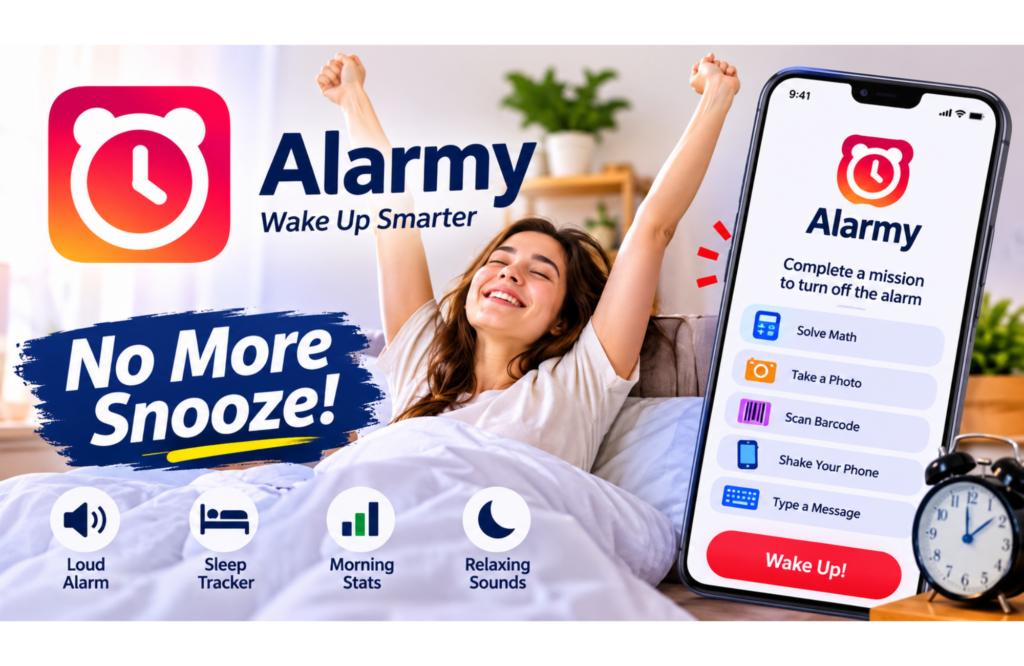
The mission system is one of its most recognizable features. Users can select a challenge that must be completed before the alarm stops.
Depending on availability, missions include mathematics, memory, shaking, typing, photo, and QR or barcode scanning.
2. Math Mission
This feature requires users to solve mathematical questions after waking up. Users can choose the difficulty level according to their preferences.
It is a useful option for people who want a simple mental challenge before starting their day.
3. Photo Mission
The Photo Mission requires users to take a picture of a previously registered object or location.
For example, you can register a picture of your bathroom sink. When your alarm rings, you must get out of bed and take a matching picture to complete the challenge.
4. QR Code and Barcode Mission
Users can register an existing product barcode or a QR code and place it somewhere away from their bed.
When the alarm starts, they must find and scan the registered code. This encourages them to physically leave their sleeping area.
5. Shake Mission
The Shake Mission requires users to shake their smartphones a selected number of times.
It offers a simple physical activity that makes the waking experience more interactive.
6. Memory and Typing Missions
Memory challenges require users to remember and repeat information. The typing mission allows users to type motivational messages or other selected text.
These options provide different ways to make the morning experience more engaging.
7. Powerful Alarm Sounds
Users can choose from various alarm tones according to their preferences. The application offers loud sounds designed to get the attention of people who have difficulty waking up.
8. Wake Up Check
Wake Up Check is designed to help users avoid returning to sleep after dismissing their initial alarm.
Depending on the selected settings and available features, another alarm can be triggered if the user does not confirm that they are awake.
9. Sleep Tracking and Analysis
The sleep-related tools help users observe aspects of their sleeping habits. Sleep analysis and snore detection can provide additional information about their nighttime routine.
However, these tools should not be considered a medical diagnosis or a replacement for professional sleep advice.
10. Customizable Alarm Settings
Users can create alarms according to their daily schedules, select different sounds, and configure available missions.
This flexibility makes the application useful for different routines, including studying, working, and exercising.
Image of the Alarmy
Tips for Using Effectively
Installing an alarm application is only the first step. Using it correctly can make your morning routine more manageable.
Here are some practical tips:
1. Choose a Suitable Alarm Time
Set your alarm according to your daily responsibilities. Avoid setting it too early if you are not getting enough sleep.
2. Place Your Phone Away From Your Bed
Keep your smartphone on a table or another safe location away from your pillow. This makes it harder to dismiss the alarm while lying down.
3. Start With an Easy Mission
If you are using mission-based alarms for the first time, choose an easy challenge. You can increase the difficulty later.
4. Try the Barcode Mission
Register a barcode from an everyday product and place it somewhere you must visit after waking up, such as near your bathroom.
5. Use Different Alarms for Different Activities
Create separate alarms for school, work, exercise, and other important responsibilities.
6. Maintain a Consistent Sleep Schedule
Try to sleep and wake up at similar times every day. A regular schedule can make mornings easier.
7. Test Your Alarm Settings
Before depending on an important alarm, check its sound, mission, permissions, and notification settings to make sure everything works correctly.
Is Alarm Safe to Use?
Safety and privacy are important when installing any mobile application. The application is distributed through official app stores, and its developer provides information about permissions and data handling. However, users should understand why certain permissions may be requested. For example:
- Camera access is needed for photo and QR or barcode missions.
- Location access can be used for location-based weather information.
- Storage or photo access may be required for certain image-related functions.
- Additional Android permissions support specific alarm features.
- Accessibility Service access is used for the optional Prevent Turn Off feature.
According to the Google Play Store’s developer-provided Data Safety information, the application may collect certain information, including location and personal information, and may share some data categories with third parties. Data is encrypted in transit, and users can request data deletion. Before installing, review the current privacy policy and permission requests. Important Security Advice: Download the application from Google Play or the Apple App Store whenever possible.
Avoid modified or unofficial APK files because they may contain harmful code, unwanted advertisements, or modified permissions. Also, remember that an alarm application cannot guarantee that every alarm will work in every situation. Keep your device charged and check your settings before relying on it for important events.
Pros and Cons
Every application has advantages and disadvantages. Understanding both sides can help you decide whether it matches your needs.
| Pros | Cons |
|---|---|
| Different wake-up missions | Some missions may feel difficult when sleepy |
| Loud and customizable alarm sounds | Loud sounds may disturb other people |
| Useful for people who struggle to wake up | Some features require a premium subscription |
| QR code and barcode scanning | Camera access is needed for related missions |
| Photo-based alarm challenges | Photo recognition may sometimes fail |
| Sleep tracking tools | Sleep analysis is not a medical diagnosis |
| Multiple alarm customization options | Requires proper settings and permissions |
Balanced Comparison: Alarmy vs. Traditional Alarm Clocks
| Aspect | Alarmy | Traditional Alarm Clocks |
|---|---|---|
| Wake-Up Method | Requires tasks to turn off the alarm. | Simply ring until manually turned off. |
| Customization | High level of customization for sounds and tasks. | Limited to preset sounds and alarms. |
| User Engagement | Promotes active engagement to ensure wakefulness. | Passive; users can easily snooze or turn off. |
| Effectiveness | Generally more effective for heavy sleepers. | May not be ef |
Frequently Asked Questions
Q.1 Is Alarmy free to use?
It offers a free version with limited features, while a premium subscription provides access to additional functionalities.
Q.2 Can I set multiple alarms with Alarmy?
Yes, allows users to set multiple alarms for different times and purposes.
Q.3 What types of tasks can I choose from to turn off the alarm?
Users can choose from various tasks, including math problems, photo-taking, and shaking the device.
Q.4 Does work offline?
Yes, can function offline, but some features may require an internet connection.
Conclusion
Alarmy Waking up on time is an important part of maintaining a productive daily routine. Traditional alarm clocks may not provide enough motivation for people who regularly ignore their alarms or return to sleep. Interactive challenges, customizable sounds, and sleep-related tools offer another approach to managing mornings.
Overall, this application is worth considering for students, employees, and heavy sleepers who want more than a basic alarm clock. Its mission-based system makes waking up more engaging, while its additional tools provide options for organizing sleep and morning routines. Before installing, check the latest version, available features, subscription details, and device compatibility. Always choose a trusted download source and review the requested permissions to enjoy a safer experience.