
Nexus Mods Unofficial is a lightweight Android application designed for fans of the gaming community. It provides quick access to favourite mods, games, and website content through a simple interface with a built-in search bar and convenient shortcuts. The app offers an ad-free browsing experience, no in-app purchases, and minimal permissions.
Users can explore mods, share content, and stay connected with the community on mobile devices. Discover its features, Android compatibility, installation details, and the latest version, V1.0.008.
Key Takeaways
- Nexus Mods is a central platform for modding video games, offering a vast library of user-created content.
- The site supports numerous popular games, allowing players to enhance their gaming experience.
- While using mods can improve gameplay, users should be aware of potential safety and security risks.
What Is Nexus Mods?
Nexus Mods is an online platform where gamers can discover, download, and share modifications for PC video games. Founded in 2001, it has grown into one of the most recognized communities for game modding. It provides a place for independent creators to share their work and for players to find new ways to customize supported games. A game modification, commonly called a mod, is user-created content that changes or adds something to an existing video game. For example, a mod might introduce new outfits, improve character appearances, add weapons, change sound effects, or adjust gameplay mechanics.
The platform supports thousands of games and offers different categories of downloadable content. Players can browse available files, read descriptions, check screenshots, explore user feedback, and review installation instructions before choosing a modification. One of its most useful tools is Vortex, a dedicated mod manager that helps users download, install, organize, and manage their game modifications. It also provides features such as mod profiles and automatic load-order management. The platform is especially useful for players who enjoy experimenting with their games and want access to content created by a worldwide community of modders.
Why Choose Nexus Mods?
Choosing a suitable modding platform can make a significant difference in your gaming experience. Beginners often find manual installation confusing because different games use different folders, file formats, and installation methods. This platform makes the discovery process easier by organizing modifications into game-specific pages and categories. You can search for your favourite game and explore the available content without visiting multiple unrelated websites. Another reason players choose it is its large creator community. Mod authors regularly share new projects, update existing files, and provide instructions to help users understand how their creations work.
The Vortex application also makes mod management more convenient. Instead of manually organizing every downloaded file, users can manage supported modifications through a single desktop application. It is particularly useful for:
- Players who want to customize their favourite PC games.
- Beginners looking for organized mod downloads.
- Gamers interested in graphics and visual improvements.
- Players who want additional characters, weapons, and items.
- Users who prefer managing multiple modifications together.
- Mod creators who want to share their projects with other gamers.
However, not every modification works with every game version. Checking compatibility before installation is important.
Nexus Mods Alternatives: Other Platforms to Explore
Although many gamers use this platform, it is not the only place to find game modifications. Different platforms focus on different games and modding communities.
Here are some popular alternatives worth considering.
1. Steam Workshop
Steam Workshop is a community platform integrated into Steam. It allows players to discover and subscribe to modifications for supported games. Its main advantage is convenience. When a game supports Workshop integration, users can often subscribe to a modification and let Steam handle the download process.
It is a good option for gamers who want a simple installation experience without managing files manually.
2. ModDB
ModDB is another well-known website for discovering modifications, custom maps, total conversions, and other community-created gaming content. It is particularly useful for older PC games and projects that introduce major changes to the original gameplay.
Players can explore development updates, screenshots, videos, and discussions about different modding projects.
3. CurseForge
CurseForge is a popular platform for Minecraft modifications, modpacks, and other supported gaming communities. It helps players discover individual mods as well as collections of modifications that work together.
It is particularly useful for people who want to change Minecraft gameplay or install larger modpacks without organizing every file individually.
4. Modrinth
Modrinth is another popular choice, especially among Minecraft players. It provides a searchable library of community-created modifications, resource packs, shaders, and modpacks.
Its clean interface and dedicated modding tools make it a useful alternative for players who prefer exploring Minecraft content.
5. Mod Organizer 2
Mod Organizer 2 is a dedicated application for managing game modifications. It is particularly popular among experienced modders working with games such as Skyrim and Fallout. It provides detailed control over mod files, profiles, and load orders.
Unlike a general mod-hosting website, it is primarily a management tool rather than a complete replacement for a mod download community.
Main Features of the Platform
There are several features that make this modding community useful for both beginners and experienced gamers.
Large Mod Library
Users can explore a wide selection of modifications for supported PC games. Available content ranges from small cosmetic changes to extensive gameplay overhauls.
Vortex Mod Manager
Vortex is an official mod management application developed by Nexus Mods. It helps users install, organize, enable, disable, and update supported modifications.
It also provides tools for handling file conflicts and managing load orders.
Collections
Collections allow experienced creators to organize multiple modifications into a curated package.
Instead of searching for and installing every file separately, users can follow a collection through Vortex. This makes it easier to recreate a particular gaming setup.
Game-Specific Categories
Modifications are organized around supported games, making it easier to find relevant files.
Players can explore categories such as characters, weapons, graphics, environments, gameplay improvements, and additional content.
User Reviews and Comments
Mod pages can include comments, feedback, and discussions from other players.
These sections can help users understand installation problems, compatibility issues, and the experiences of people who have already tried a particular file.
Mod Updates
Creators can release updated versions of their modifications when they fix problems, improve performance, or introduce additional features.
Vortex can also help users identify available updates for managed mods.
Creator Community
The platform gives mod authors a place to publish their projects and connect with other gamers.
Its community-focused approach encourages creativity and helps players discover new content.
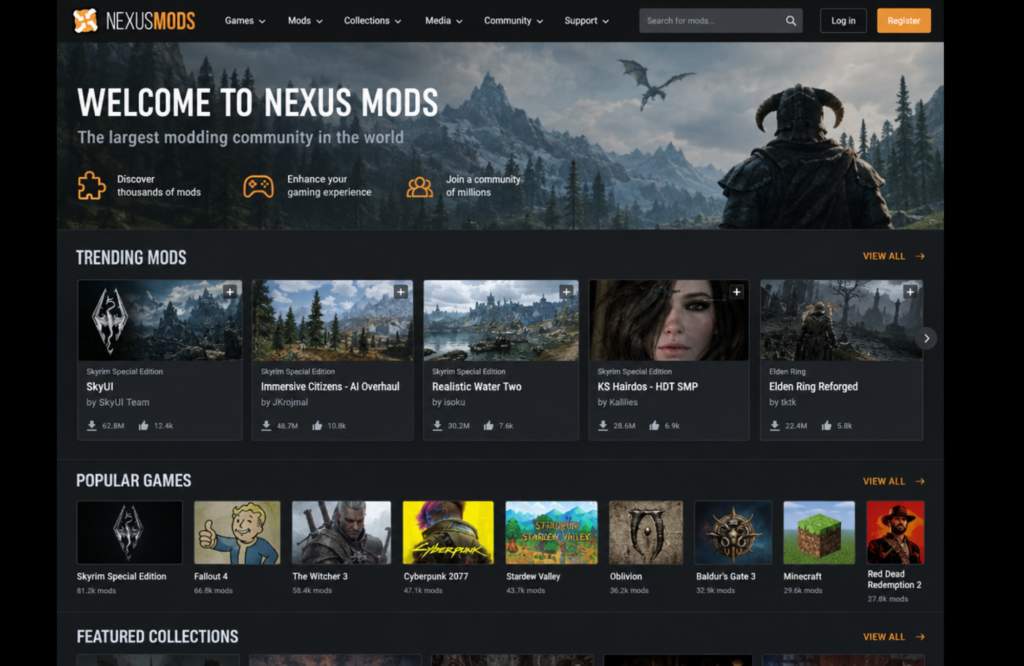
Image of the Nexus Mods
The History of Nexus Mods
Nexus Mods began as a small modding community site in 2001, initially focusing on The Elder Scrolls III: Morrowind. Over the years, it expanded to include mods for numerous other games, becoming a leading platform for modding enthusiasts. Key milestones in its development include the introduction of user accounts, mod versioning, and a robust comment and rating system, which fostered community engagement. Today, supports thousands of games and millions of mods, maintaining its status as a premier destination for gamers looking to customize their experiences.
How to Use Nexus Mods?
Using Nexus Mods is straightforward. First, users need to create a free account on the website. Once registered, they can browse the extensive library of mods available for their favorite games. Each mod page includes detailed descriptions, installation instructions, and user reviews.
To install a mod, users typically download the mod file and follow the provided instructions, which may involve using mod management tools like Nexus Manager or Vortex. These tools simplify the installation process and help manage multiple mods efficiently. The site also provides various tutorials and guides to assist new users in navigating the modding process.
Popular Games Supported by Nexus Mods
Nexus Mods supports a wide array of popular games, making it a versatile platform for modding. Some of the most notable titles include The Elder Scrolls series (like Skyrim and Oblivion), Fallout series (such as Fallout 4), and other well-loved games like Dark Souls, The Witcher 3, and Stardew Valley.
Each of these games has a rich modding community, offering everything from gameplay enhancements to visual improvements, allowing players to tailor their gaming experience to their preferences. newer titles like Cyberpunk 2077 and Resident Evil Village have started to gain traction on the platform, further expanding the variety of mods available to players.
The Benefits of Using Nexus Mods
The primary benefit of using Nexus Mods is the ability to customize games significantly. Mods can enhance graphics, fix bugs, add new content, and improve gameplay mechanics. the platform fosters a sense of community among users, allowing mod creators to share their work and receive feedback.
This community aspect encourages collaboration and innovation, leading to high-quality mods. many mods are free, making it accessible for gamers to enhance their experiences without any financial investment. The platform also allows for the creation of unique mods that can introduce new gameplay mechanics, quests, and even entire storylines, providing endless possibilities for players seeking fresh content.
Safety and Security Considerations
While Nexus Mods offers a wealth of user-generated content, users should be mindful of safety and security. Downloading mods from unofficial sources can pose risks, including malware or corrupted files. To mitigate these risks, it is essential to read user reviews, check mod ratings, and ensure that mods are compatible with the game version.
Additionally, using mod management tools can help streamline the installation process and reduce the likelihood of conflicts between mods. Implements a system that allows users to report malicious content, helping to maintain a safer environment for downloading mods.
Community and Support
The Nexus Mods community is vibrant and supportive, offering various resources for users. Forums and discussion boards provide a space for users to share experiences, seek help, and discuss modding techniques. The platform also features a comprehensive FAQ section and guides for both new users and experienced modders.
For users encountering issues, the community can often provide quick solutions, making it easier to navigate the modding landscape. Additionally, hosts events and contests to encourage creativity and engagement among its users, further strengthening the sense of community.
Security: Is It Safe to Download Mods?
Security is an important consideration when downloading files from any online platform. Game modifications are created by independent developers and community members, so users should always check the source and understand what they are installing. An established modding community provides useful features such as creator information, file descriptions, version history, and user feedback. However, these features should not be treated as a guarantee that every downloadable file is completely safe. Here are some important precautions:
- Download modifications from the official website whenever possible.
- Check the creator’s profile and upload history.
- Read the file description before downloading.
- Avoid suspicious external download links.
- Scan downloaded archives with reputable security software.
- Do not disable antivirus protection just because an installation guide requests it.
- Keep your game and mod management software updated.
- Avoid sharing personal information with unknown websites.
It is also important to remember that some modifications may affect game performance, cause crashes, or conflict with other installed files. For better protection, download only the files you understand and follow the instructions provided by their creators.
Pros and Cons of Nexus Mods
Every modding platform has advantages and limitations. Understanding both sides can help you decide whether it is suitable for your needs.
| Pros | Cons |
|---|---|
| Large collection of game modifications | Not every game is supported |
| Content created by a worldwide community | Some mods require additional files |
| Vortex helps simplify installation | Beginners may find advanced settings confusing |
| Collections make mod setups easier | Some collections require considerable storage |
| User comments and file information | Conflicting mods can cause game crashes |
| Regular updates from creators | Compatibility depends on game versions |
FAQs About Nexus Mods (People Also Ask)
Q.1 What types of mods can I find on Nexus Mods?
Nexus Mods hosts a wide variety of mods, including gameplay enhancements, visual improvements, new quests, character modifications, and much more.
Q.2 Is it safe to download mods from Nexus Mods?
While Nexus is generally safe, users should always read reviews, check ratings, and use mod management tools to ensure compatibility and security.
Q.3 Do I need special software to use Nexus Mods?
While you can manually install mods, using mod management tools like Mod Manager or Vortex can simplify the process and help manage multiple mods more effectively.
Q.4 Can I create and upload my own mods on Nexus Mods?
Yes, users can create and upload their own mods to, contributing to the community and sharing their creations with other gamers.
Conclusion
Nexus Mods modifications provide an exciting way to personalize PC gaming. Whether you want improved graphics, new characters, additional weapons, custom environments, or completely different gameplay experiences, community-created content can help make familiar games feel fresh again. For players interested in exploring game modifications, this platform offers an extensive community, organized downloads, creator information, and useful management tools. Vortex makes many installation and organization tasks easier, while Collections provide a convenient way to explore curated mod setups.
Before installing any modification, remember to check its compatibility, read the creator’s instructions, and protect your original game files. With the right approach, you can enjoy a more customized gaming experience while avoiding many common modding problems.