
Discover how Facebook Marketplace helps users buy and sell products, manage listings, connect with buyers, and explore local deals. Learn about Meta AI selling tools, automated listing creation, inventory management, buyer messaging, sales tracking, and pricing recommendations.
Explore the Seller app, product discovery, secure transactions, scam prevention, and popular alternatives. Get practical tips for smarter online shopping and safer selling on TurboAPKs.com.
What Is Facebook Marketplace?
Facebook Marketplace is Facebook’s online buying-and-selling section. It allows eligible users to discover products listed by individuals and businesses in supported locations. The platform covers many product categories, including electronics, furniture, clothing, home accessories, vehicles, and other everyday items. Buyers can search for products, explore listings, compare prices, and contact sellers to discuss a purchase. For example, imagine that you need a study table for your bedroom. Buying a brand-new table from a furniture shop might be expensive. On an online marketplace, you may find someone in your area selling a used table for less.
Similarly, if you have an old smartphone that you no longer use, you can create a listing and let interested buyers contact you. The basic process is simple:
- Open Facebook Marketplace and find the Marketplace section.
- Search for the product you want.
- Browse available listings and compare prices.
- Contact the seller to ask questions.
- Agree on the price, payment method, and delivery or collection arrangements.
- Check the product and complete the transaction carefully.
The exact buying, payment, and delivery options depend on the country and the features available to your account. Not every listing includes an integrated checkout service.
Why Choose an Online Facebook Marketplace for Buying and Selling?
Online Facebook Marketplace are popular because they make it easier for people to discover products without visiting multiple physical stores.
Here are some reasons why buyers and sellers find these platforms useful.
1. Find Affordable Products
One of the main advantages is the opportunity to find second-hand products at reasonable prices. For example, someone moving to another city might sell a sofa, refrigerator, or washing machine because they cannot take these items to their new home.
Buyers may find these products at prices lower than those of comparable new items. However, always compare prices and inspect the condition of a product before purchasing it.
2. Sell Unused Items
Many households contain things that are no longer needed. These might include old furniture, unused kitchen appliances, children’s toys, books, or electronic devices.
Instead of allowing these items to collect dust, owners can create listings and connect with potential buyers. This can help sellers recover some of the money they originally spent.
3. Discover Products Near You
Location-based searching can help users find products available in nearby areas. This is particularly helpful when buying large items, such as beds, tables, chairs, or refrigerators, because collecting them locally may reduce delivery costs.
Buyers can also ask sellers about collection arrangements before making a decision.
4. Communicate Directly With Sellers
Buyers can usually contact sellers through Facebook Marketplace Messenger to ask about product condition, availability, price, and collection arrangements. For example, before purchasing a used laptop, you can ask about its battery condition, storage capacity, physical damage, and repair history.
Clear communication helps buyers make more informed decisions.
5. Support Local Communities
Local buying and selling can help people exchange useful products within their communities.
Small sellers may also use online listings to reach interested customers, although the available business features and applicable policies can vary.
Main Features of Facebook Marketplace
The Facebook Marketplace offers several useful features that help buyers discover products and sellers manage their listings.
Product Listings
Sellers can create listings containing product photos, titles, descriptions, prices, and other relevant details. A clear listing helps buyers understand what is available before contacting the seller.
For example, a good listing for a used phone should mention its model, storage capacity, physical condition, included accessories, and asking price.
Search and Filters
Search tools help users find specific products instead of browsing every available listing. Depending on the interface, users may be able to narrow their results by location, category, price, and other criteria.
If you are searching for a bicycle, for example, you can enter the product name and adjust the available filters to find suitable options.
Local Product Discovery
Users can explore products offered by sellers in their selected areas. This can be useful for finding furniture, household goods, and other items that are easier to collect in person.
The availability of nearby listings depends on the location and the number of active sellers.
Messenger Communication
Messenger allows buyers and sellers to discuss a listing. Buyers can ask questions, request additional photographs, and negotiate a reasonable price. Sellers can respond to enquiries and arrange collection or delivery where available.
Keep important conversations on the platform when possible, and be cautious if someone pressures you to move immediately to an unfamiliar website or messaging service.
Seller Profiles
A seller’s profile may provide useful information about their account and activity. Review the available profile details, ratings, reviews, and previous listings when these are visible.
However, a profile that looks genuine does not guarantee that a seller is trustworthy. Always verify the product and transaction details independently.
Saved Listings
Some versions of the platform allow users to save interesting listings for later.
This is useful when comparing several products before deciding which one offers the best value.
Selling Tools and AI Assistance
Meta announced additional AI-powered selling features in March 2026, including tools that can help eligible sellers create listing drafts, suggest prices, and prepare replies to common questions.
The availability of these tools can differ by country, account, and rollout status. Sellers should review automatically generated information before publishing it.
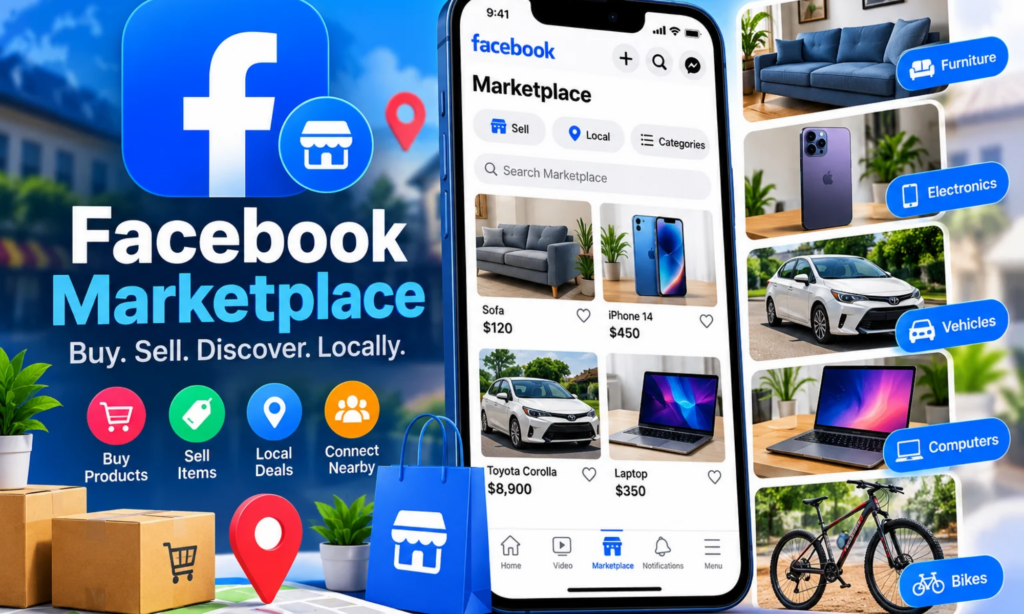
Image of the Facebook Marketplace
How to Buy Products Safely?
Buying online can save time and money, but you should never assume that every listing is genuine.
Follow these steps to reduce the risk of problems.
Step 1: Research the Product
Before contacting a seller, learn about the product you want to purchase. Check its normal market price, important features, and common problems.
For example, if you want to buy a used smartphone, research its current price and check whether the model still receives software updates.
Step 2: Compare Multiple Listings
Do not purchase the first item you see. Compare several listings to understand the normal price range and available choices.
An unusually cheap offer may be genuine, but it can also be a warning sign.
Step 3: Ask Clear Questions
Ask the seller about the product’s condition, age, accessories, repairs, and any known defects.
For expensive products, request additional photographs or a demonstration when appropriate.
Step 4: Inspect the Item
Whenever possible, examine the product before paying. For electronics, check that the device works, the important functions operate correctly, and the serial number or other identifying information is consistent where relevant.
For furniture, inspect its structure, dimensions, and visible damage.
Step 5: Agree on Payment and Delivery
Confirm the total price, delivery arrangements, and payment method before completing the purchase. Never rely only on a payment screenshot. If you receive money electronically, check your actual account balance or transaction history.
Purchase protection, where available, depends on the transaction method and the applicable terms. Do not assume that every local or person-to-person transaction is protected.
How to Sell Products Successfully?
Selling online requires more than simply uploading a photograph and waiting for a buyer.
A clear listing, realistic price, and helpful communication can improve your chances of making a sale.
Take Clear Product Photographs
Use bright lighting and take photographs from several angles. Show the actual product rather than relying only on pictures taken from another website.
If the item has scratches, cracks, or other damage, include photographs that show these problems. Honest photographs help buyers understand what they are considering.
Write a Descriptive Title
Your title should explain exactly what you are selling. For example:
- Used Samsung Smartphone, 128GB Storage
- Wooden Study Table in Good Condition
- Office Chair With Adjustable Height
- Second-Hand Washing Machine
Avoid titles that are vague or filled with unrelated words.
Provide Accurate Details
Write a description that answers the questions a buyer is likely to ask. Include the product’s condition, important specifications, age where known, included accessories, and any defects.
Accurate descriptions can reduce unnecessary messages and misunderstandings.
Set a Reasonable Price
Research similar products before deciding on your asking price. Consider the item’s age, condition, brand, and current market value.
You may choose to leave some room for reasonable negotiation, but your price should still reflect the product’s actual worth.
Respond Professionally
Reply to genuine enquiries politely and provide clear answers. If an item has already been sold, update the listing where possible to avoid wasting other people’s time.
Never share passwords, login codes, or sensitive financial information with potential buyers.
Tips for Using the Facebook Marketplace Platform Effectively
Whether you are buying your first product or selling items from your home, these practical tips can make the experience easier.
Compare prices before making a decision. A product with a lower asking price is not always the best deal. Consider its condition, reliability, and any additional costs.
Check the seller’s information. Review available profile details and previous activity, but remember that these details cannot prove someone’s identity or honesty.
Use specific search terms. Instead of searching for a broad term such as “phone,” try a product name, model, or storage capacity.
Read descriptions carefully. Make sure you understand what is included in the advertised price.
Avoid unnecessary personal information. You do not need to disclose your home address, passwords, or private financial details to discuss an ordinary purchase.
Keep records of important agreements. Save relevant messages, listing details, and transaction information in case a disagreement occurs.
Be patient when negotiating. A respectful conversation is more useful than pressuring someone into accepting an offer.
Check local rules. Make sure the product is legal to buy or sell and complies with the platform’s commerce policies.
Is Facebook Marketplace Safe?
An online Facebook Marketplace can be useful, but safety depends partly on how buyers and sellers behave. Scammers sometimes create fake listings, copy photographs, impersonate genuine sellers, or send fraudulent payment messages. Both buyers and sellers can become targets.
For example, a seller might advertise a smartphone at an unusually low price and demand an advance payment before allowing the buyer to see it. After receiving the money, the seller may disappear. Another scam involves a buyer sending a fake payment confirmation and asking the seller to hand over the product before the payment has actually arrived. To protect yourself, follow these precautions.
Meet in a Safe Location
If you arrange a local exchange, choose a busy, well-lit public location whenever practical. Tell a trusted person where you are going, and consider taking someone with you when buying an expensive item.
Avoid inviting unknown people into your home unnecessarily.
Avoid Suspicious Advance Payments
Be cautious when someone demands a deposit without providing reasonable evidence that the product exists and is available. Never send money simply because a seller claims that other buyers are waiting.
For remote purchases, use a payment and delivery method that provides appropriate protection, if one is available in your country.
Watch for Fake Payment Messages
Always verify payments through your own bank or payment application.
Do not trust screenshots, emails, or text messages as proof that money has arrived.
Never Share Verification Codes
Do not share your Facebook password, one-time verification code, or account recovery information.
A genuine buyer does not need these details to purchase an ordinary item.
Report Suspicious Activity
If a listing or user appears fraudulent, stop communicating when appropriate and use the platform’s reporting tools.
For additional guidance, read Meta’s official educational resources on avoiding scams and shopping safely.
Alternatives to Facebook Marketplace
People search for alternatives for many reasons. Some want a dedicated shopping website, while others prefer local classified advertisements, specialist stores, or platforms with different delivery options.
The best alternative depends on your country, the type of product you want, and how you prefer to pay.
1. OLX
OLX operates classified-advertising services in selected markets. Users can find listings for various products and contact advertisers, depending on the local service. It may be useful for people looking for second-hand furniture, electronics, vehicles, and household items.
Availability, features, and transaction arrangements differ by country.
2. eBay
eBay is an online marketplace where users can find new and used products from individual sellers and businesses. It can be useful for discovering products beyond your immediate area, including collectibles, electronics, clothing, and specialist items.
Buyers should review seller feedback, shipping charges, return conditions, and applicable buyer-protection terms before placing an order.
3. Amazon
Amazon is an online shopping platform that offers products from Amazon and third-party sellers in supported markets. It is particularly useful for comparing new products, reading customer reviews, and checking product specifications.
The selection, shipping options, and payment methods depend on the country and the particular Amazon store.
4. Craigslist
Craigslist provides classified advertisements in selected locations. Depending on the local section, users can browse listings for furniture, household goods, vehicles, and other categories.
Buyers should carefully check advertisements and use safe arrangements when contacting unknown sellers.
5. Local Buy and Sell Groups
Some communities have dedicated online groups where members advertise products and arrange local transactions. These groups may be helpful for finding furniture, clothing, and other items within a particular city or neighbourhood.
However, joining a community group does not automatically make every seller trustworthy.
Which Alternative Should You Choose?
Choose a platform based on your specific needs.
| Platform | Best For | Important Consideration |
|---|---|---|
| OLX | Local classified listings in supported markets | Check the local service and seller carefully |
| eBay | New and used products from a wider range of sellers | Review shipping, returns, and buyer protection |
| Amazon | Shopping for new products and comparing reviews | Check regional availability and delivery |
| Craigslist | Local classified advertisements in supported locations | Arrange transactions carefully |
| Local buy and sell groups | Community-based buying and selling | Verify listings and meet safely |
No single platform is best for every buyer. Compare the available products, costs, transaction options, and safety policies before deciding.
Pros and Cons of Facebook Marketplace
Understanding the advantages and disadvantages can help you decide whether an online Facebook Marketplace is suitable for your needs.
Advantages
Easy product discovery: Buyers can browse many listings without visiting multiple physical stores.
Potential savings: Second-hand products may cost less than comparable new items.
Convenient communication: Buyers and sellers can discuss products before making a decision.
Opportunity to sell unused belongings: Individuals can advertise items they no longer need.
Local shopping options: Nearby listings may make collection easier and reduce delivery costs.
Variety of products: Users can find items ranging from household furniture to electronic devices.
Disadvantages
Risk of scams: Fake listings and fraudulent payment requests can cause financial losses.
Variable product quality: Second-hand products may have hidden defects or limited remaining life.
No guarantee of seller honesty: A profile or listing does not independently prove that a product is genuine.
Inconsistent availability: Search results and transaction features differ across locations.
Possible communication problems: Some buyers and sellers may cancel arrangements or fail to respond.
Limited transaction protection in some situations: Protection may not apply to cash payments or other person-to-person arrangements.
The main lesson is simple: convenience is valuable, but careful checking is essential.
FAQs About Facebook Marketplace Online Buying and Selling
1. What is Facebook Marketplace used for?
It is used to discover, buy, and sell products through listings created by individuals and businesses in supported locations. Common categories include electronics, furniture, clothing, vehicles, and household goods.
2. Is the service free to use?
Browsing listings and communicating with sellers are generally free. However, costs can arise from shipping, payment processing, advertising, or other services, depending on the transaction and location.
Always check the terms that apply to your particular listing or purchase.
3. Do I need a Facebook Marketplace account?
You generally need an eligible Facebook Marketplace account to access Marketplace features. Access may also depend on your age, location, account status, and compliance with platform policies.
4. Why can I not see the Facebook Marketplace icon?
Possible reasons include account eligibility, regional availability, account restrictions, or changes to the Facebook interface.
Check the Facebook Marketplace menu, confirm that you are using an eligible account, and review any notices about access restrictions. If necessary, consult the official Facebook Help Center.
5. Can I sell used products?
Yes. Used products can be listed when they comply with the platform’s applicable rules.
Provide accurate descriptions, clear photographs, and honest information about the item’s condition.
6. How can I identify a fake seller?
Warning signs include unusually low prices, pressure to pay immediately, inconsistent product information, requests for verification codes, and refusal to allow reasonable checks.
Review the available account information, ask questions, and verify the product before paying. No single warning sign proves that someone is a scammer, but several warning signs together deserve serious attention.
Conclusion
Online marketplaces have changed the way people discover products, sell unused belongings, and connect with local buyers. They provide convenient access to a wide range of items and can help people compare prices before making a purchase. Facebook Marketplace can be a useful option for buyers looking for affordable products and sellers who want to reach people in their communities. However, the quality of each transaction depends on careful research, honest communication, and sensible safety precautions.
Before buying, compare listings, inspect products when possible, and verify payment arrangements. Before selling, create accurate listings, use genuine photographs, and avoid suspicious requests. If you prefer a different shopping experience, alternatives such as OLX, eBay, Amazon, Craigslist, and local classified groups may be worth exploring, depending on your location and requirements. The most important rule is to make informed decisions rather than rushing into a deal. With careful planning and realistic expectations, buying and selling online can become a more convenient and rewarding part of everyday life.